Kali Linux 2025.4 Release (Desktop Environments, Wayland & Halloween Mode)
Table of Contents
Say hello to Kali Linux 2025.4! Expect updated tools, performance tweaks, and improved support - no fluff, just the essentials.
The summary of the changelog since the 2025.3 release from September is:
- Desktop Environments - Changes to all! GNOME, KDE & Xfce
- Wayland - VM Guest Utils Support
- Halloween Mode - dresses the desktop for the occasion
- 3 New Tools - As always, new packages added and upgraded!
Desktop Environments
GNOME 49
As with previous GNOME updates in Kali, we’ve given all our themes a fresh coat of paint - everything has been tuned to look sharp and feel smooth.
The Totem video player has been replaced with the new Showtime app, and the app grid now finally organizes Kali tools into folders, just like the menu does, making it far more intuitive to find the tool you need.
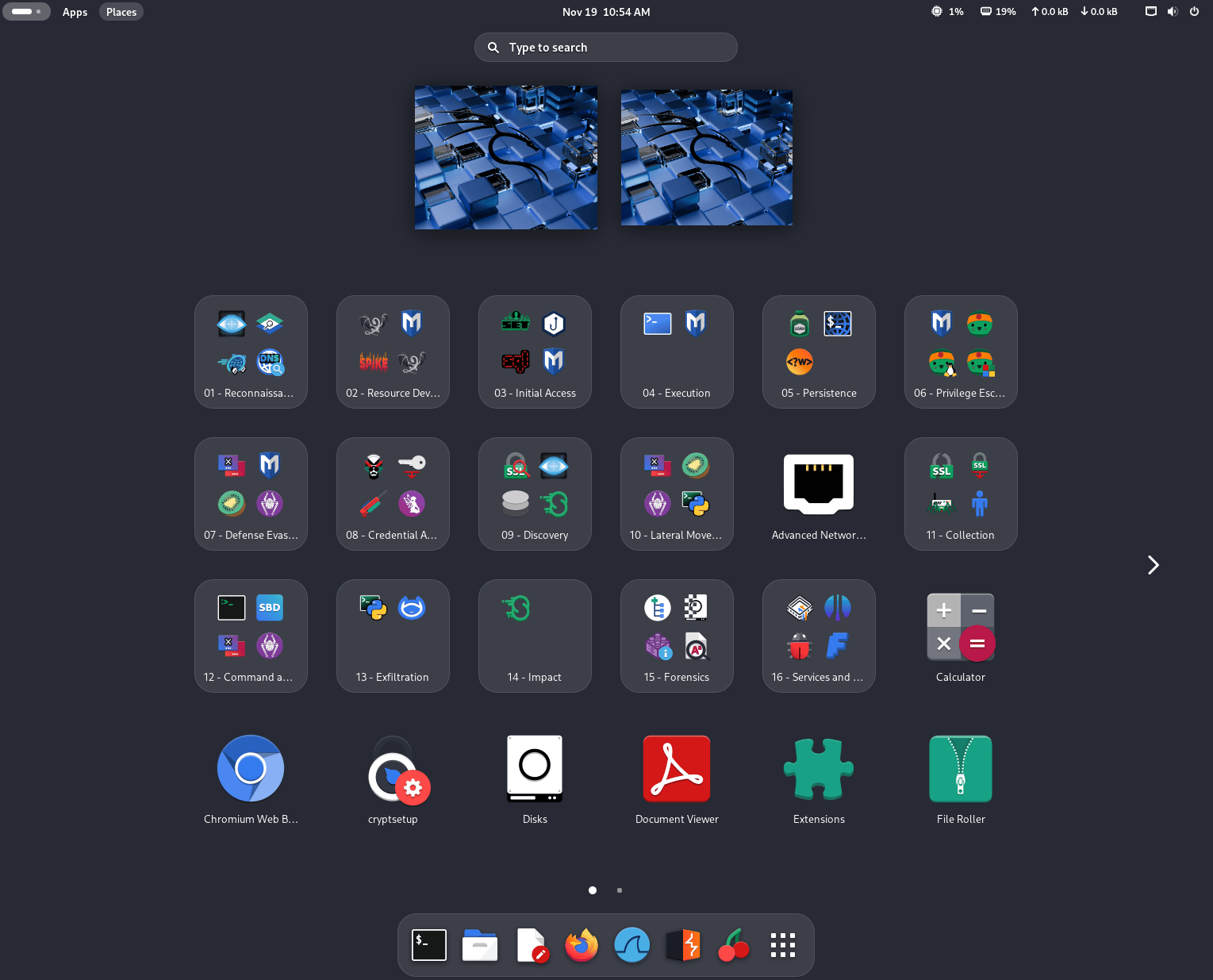
Changes to the application grid do not affect already installed versions of Kali. This is done to avoid overwriting the user’s application layout. If you still want to see the new folders in the application grid, you can force the update with the following command:
┌──(kali㉿kali)-[~]
└─$ cat /etc/dconf/db/local.d/kali-menu | dconf load /
Another quality-of-life improvement is the addition of a shortcut to quickly open a terminal (finally!), using Ctrl+Alt+T or Win+T - just like in our other desktops.
One of the major changes in GNOME 49 is the removal of X11 session support. Wayland is now the default - and only - window server, but do not worry: the transition is seamless and, as we explain later, even VM support is excellent.
If you want to know more about the details of the new shell version, check out the official GNOME 49 release notes.
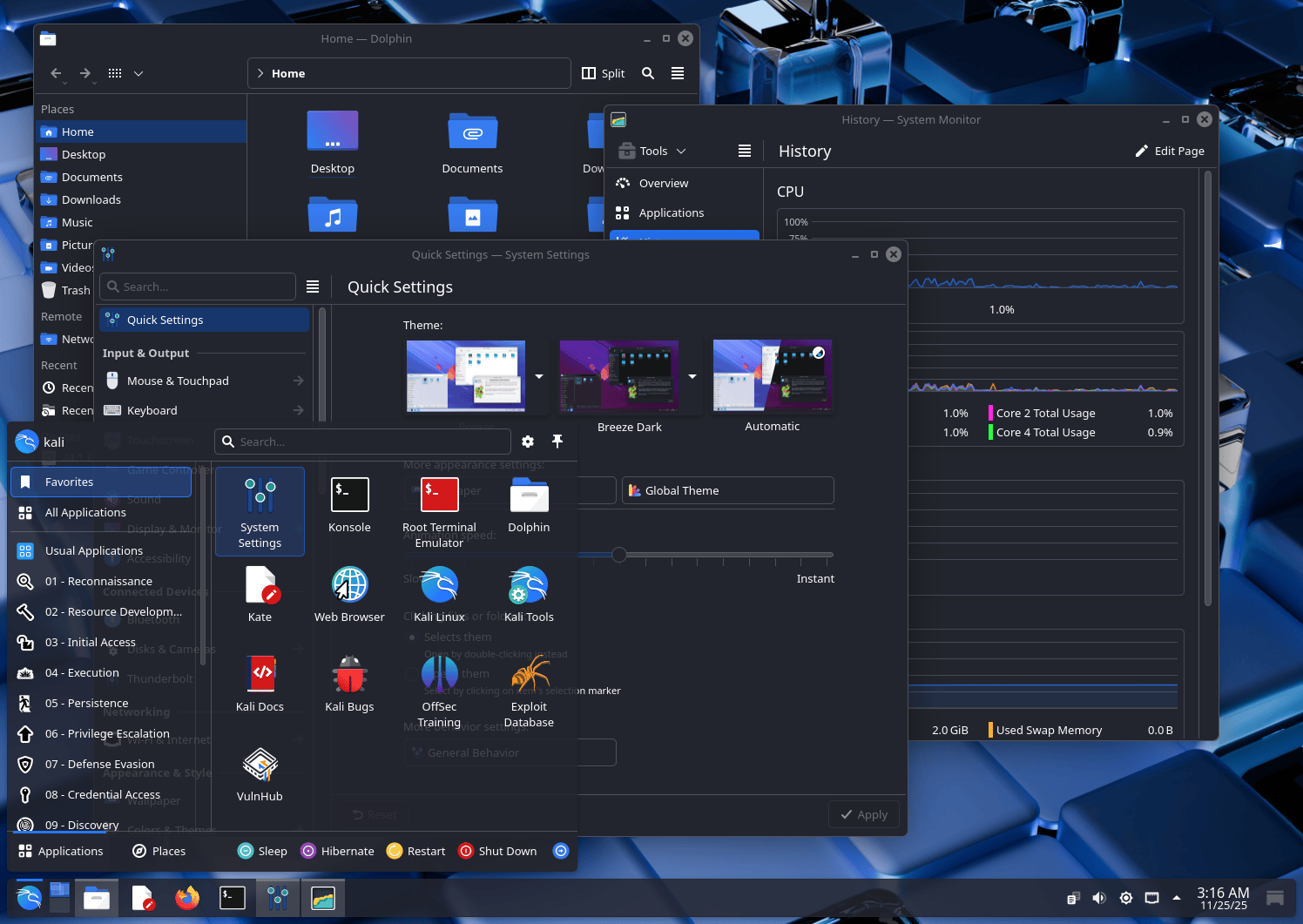
KDE Plasma 6.5
KDE Plasma desktop has been bumped up to version 6.5, which brings two major releases of the desktop together. Here are some of the most relevant new features:
- More flexible window tiling
- New screenshot tool, with extra editing features
- Quick access to pinned clipboard items in the panel
- Fuzzy matching support for KRunner (Plasma’s search/launch/calculator/… tool), which means that even if you misspell an app’s name, it will still find it for you.
If you want to learn more about the new changes for this awesome DE, check out the Plasma 6.4 announcement and Plasma 6.5 announcement.
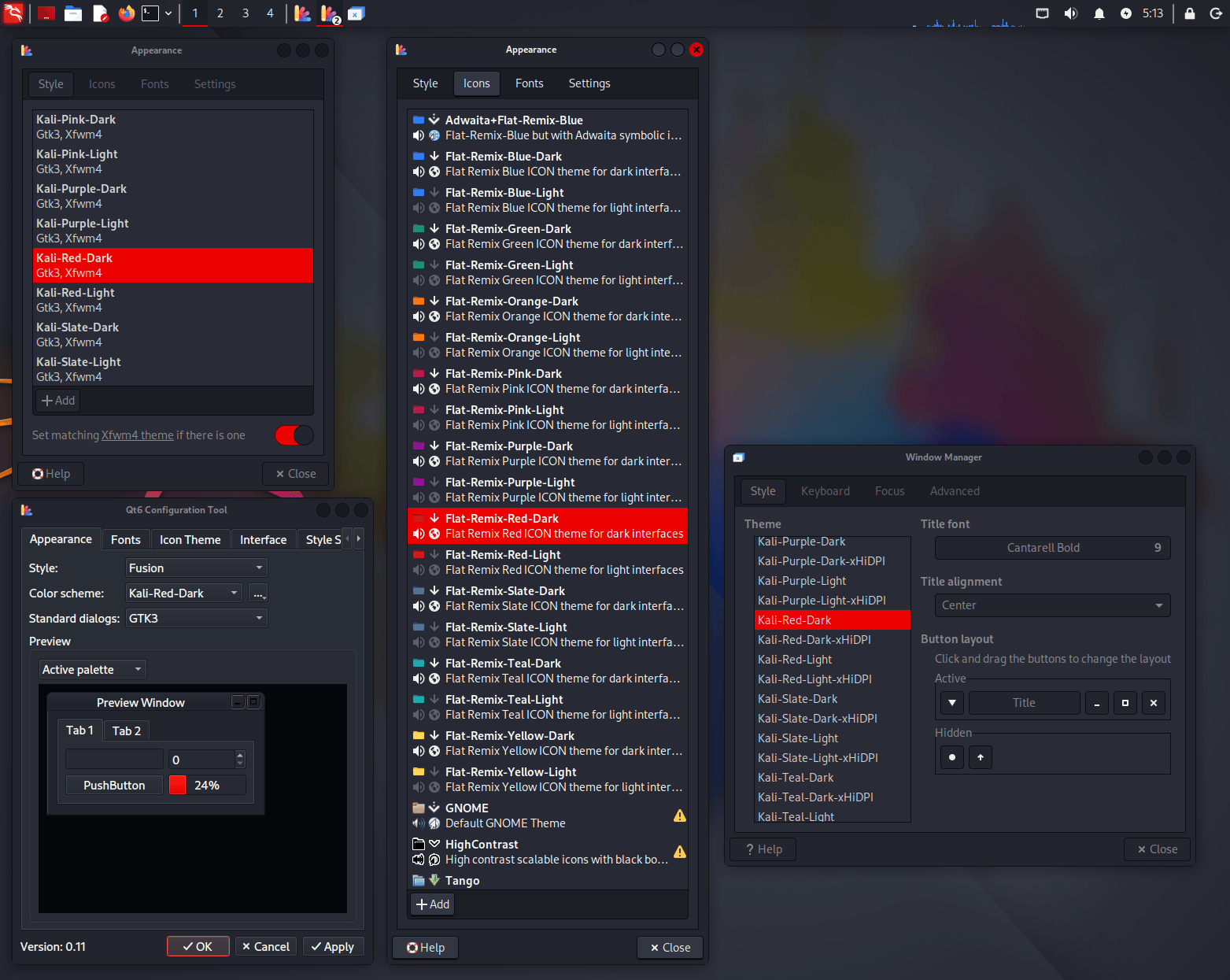
New Colors for Xfce Desktop
With this update, we wanted to bring support for color themes to Xfce, putting it on par with the already available settings in the other desktops (GNOME and KDE). Now you can fully customize the colors of your Kali installation with the new themes for icons, GTK 3/4 windows, Qt 5/6 windows, and Xfce’s window manager decorations.
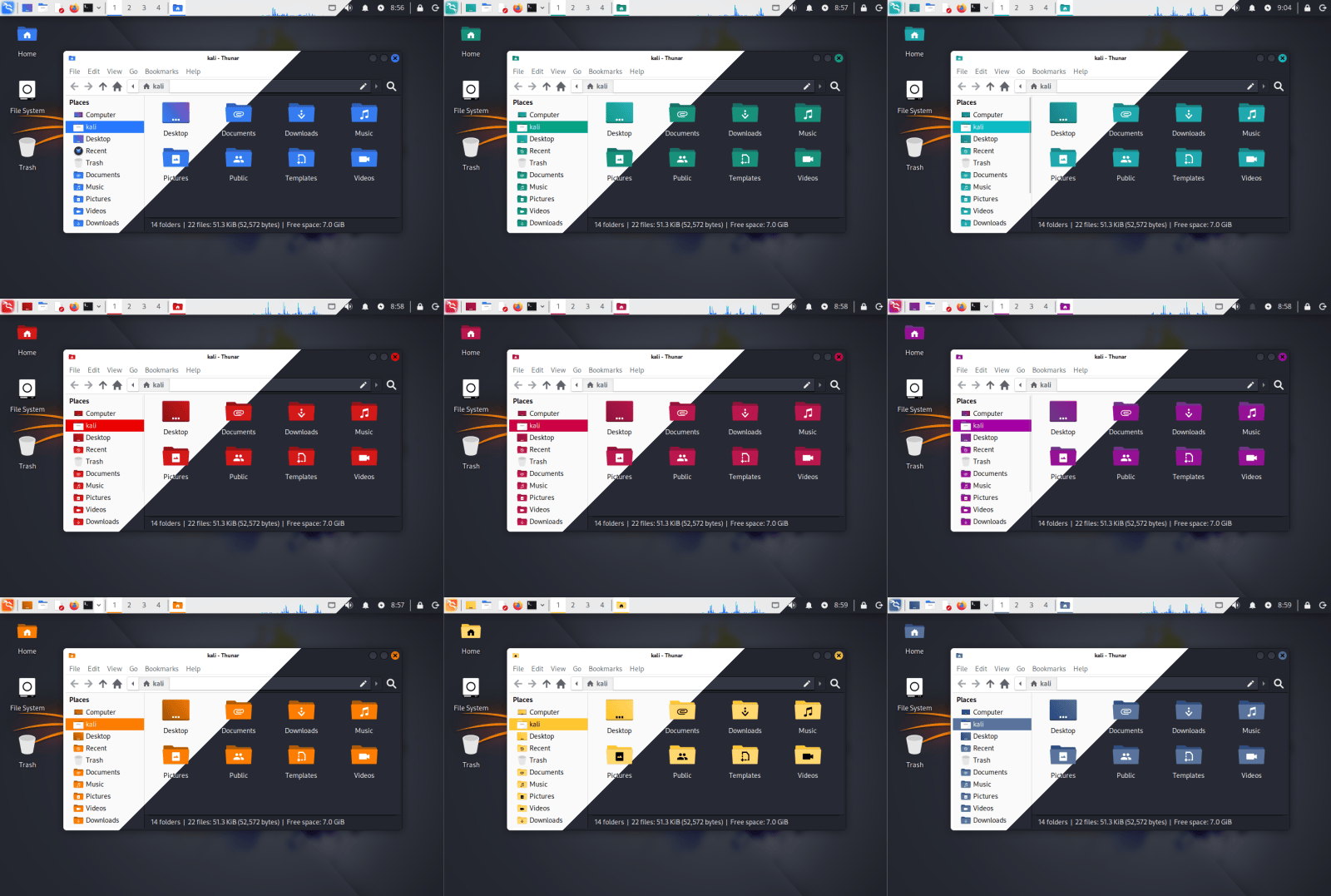
All these settings can be changed through the “Appearance” application, except for Qt programs, which require separate themes and can be tweaked through qt5ct or qt6ct (both installed by default).
VM Guest Utils Support For Wayland
Wayland is a modern display protocol that serves as the successor to the older X11 system for handling graphics in Linux. It specifies how graphical applications (clients) communicate with a display server to render content and process user input. For years, X11 has been the default system in most UNIX desktops, but the time has come for a change to more modern software with a more efficient and secure architecture.
Now that GNOME has moved to only supporting Wayland, and KDE in Kali has already used it by default for a few years (since Kali Linux 2023.1), we wanted to ensure that the transition and experience were seamless. The only thing that we felt was missing was support for VM guest tools, like clipboard sharing and window scaling, but things have been progressing, and now all the major VM software fully supports Wayland.
We have tested Kali installations with Wayland as the guest OS in VirtualBox, VMware, and QEMU, configured the missing parts, and we are happy to announce that all of the VM guest additions that you expected in X11 before are now working in Wayland without trouble.
Kali Halloween Mode
During last Halloween season, we wanted to celebrate by launching a Kali/Hacker-themed pumpkin carving contest. We also launched a new mode for kali-undercover called Halloween mode, which dresses the desktop for the occasion!
While the Halloween mode has now been hidden from the menu, you can still launch it from your terminal in case you missed it and want to give it a try.
┌──(kali㉿kali)-[~]
└─$ kali-undercover --halloween
Kali Live image Is Now Distributed Over BitTorrent Only
To download Kali images, we usually provide two options: direct HTTP download or BitTorrent. HTTP downloads are served either by a mirror from the community, or the Cloudflare CDN. For the later, there’s a hard size limit: around 5 GB, or 5,049,942,016 bytes to be precise.
We already have an image that is way, way too big for the CDN: it’s the Everything image, which contains all Kali tools, and peaks at 13 GB (installer) and 15 GB (live). This image can only be downloaded via BitTorrent.
With this release, another image will now be available only over BitTorrent: it’s the Live image
For more background: we try hard to provide the same Kali Linux experience by default, for all images: whether you download a Pre-built VM, a Installer ISO or a Live ISO, you’ll get the same Kali, with the same Xfce desktop environment, and the same set of tools pre-installed. We also try to keep the default set of tools relatively stable, so that the tools that you use today are still present in the next release.
As time passes, packages tend to gain new dependencies, acquire more features, and generally speaking: everything gets bigger and bigger, and so do our Kali images. The Live image has been flirting with the 5 GB limit for a while, and this time it’s over the limit for good.
The Live image has always been an outlier in terms of size: it is a fully-fledged and ready-to-run Kali system, but it can also be used to install Kali, meaning that it also contains the Kali installer with a minimal pool of packages. For this reason, this image has always been bigger than any others.
After discussions with the team, we decided that we did not want to remove tools from the default installation, as other images are well below the size limit. We do not want to remove tools from the Live image only either, as it’s going to be confusing, and it’s just going to make the Live image less useful. So our only option at this point is to remove the Live image from the HTTP distribution channel, and distribute it over BitTorrent only. Like we already do for the everything image.
Just to be geeky, here’s a breakdown of sizes for the last 2025.3 release, and the explanation for their sizes:
- Pre-built VM: 3.5 GB, these are the smaller images, basically it’s your default Kali Linux that is pre-installed and compressed with
xz. That’s the best we can do in terms of compression. - Installer: 4.3 GB, it contains the same set of packages, but uninstalled (ie. as
.debfiles), so in terms of compression it’s a mixed bag ofgzandxzcompression (gzcompresses much less thanxz). Additionally it contains the Kali installer, which is a kind of mini OS dedicated to installing Kali. - Live: 4.7 GB, as said above, it’s a pre-installed Kali system, compressed with
xz, plus the Kali installer, plus a minimal pool of packages.
New Tools in Kali
As with every Kali release, new tools have been introduced (to the network repositories). Below is a brief summary of the additions:
- bpf-linker - Simple BPF static linker
- evil-winrm-py - Python-based tool for executing commands on remote Windows machines using the WinRM
- hexstrike-ai - MCP server that lets AI agents autonomously run tools
In addition, numerous packages have been updated, and new libraries have been incorporated. We also bump the Kali kernel to 6.16.
Kali NetHunter Updates
We are delighted to start this year’s winter season with awesome news! As usual, snowfall is now back on the Kali NetHunter app. Bugfixes, new features, new devices, an interview, and a live showcase podcast with offensive attacks.
Android 16 Support
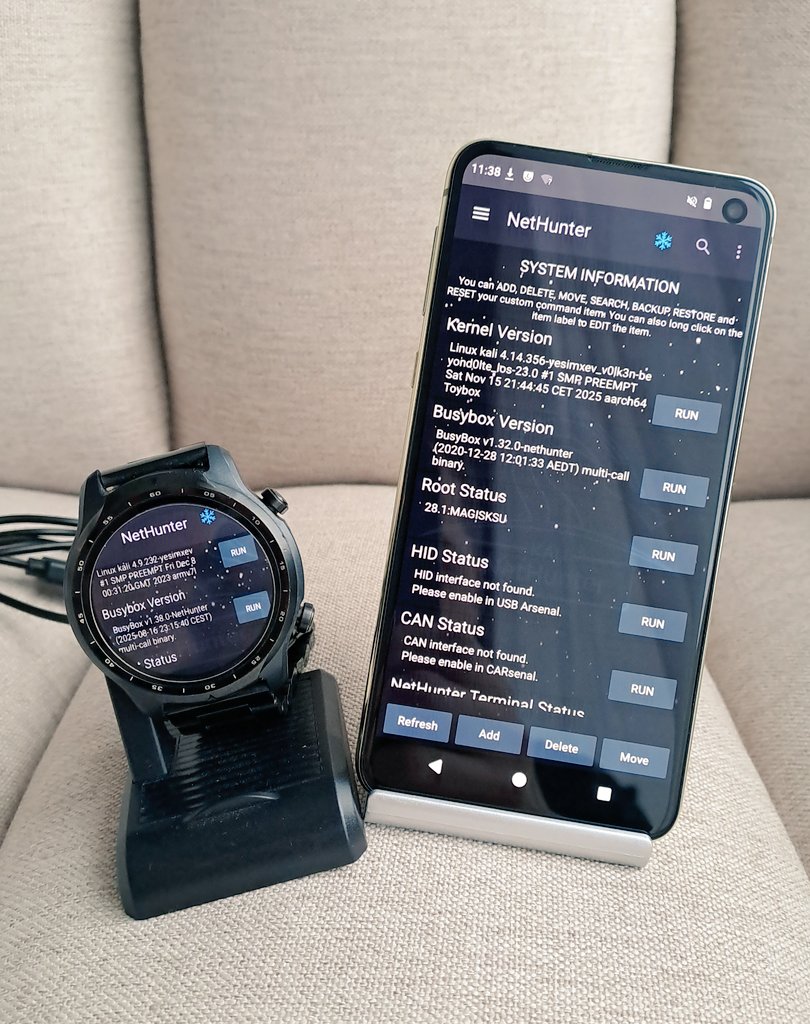
Our recommended device family kicks in the door of Android 16. Made by @V0lk3n, the Samsung Galaxy S10, S10e, S10 Plus, and S10 5G running LineageOS 23 are now added with all the Kali NetHunter features including CAN, as well as internal wireless injection support. Check out the install guide for the S10 as an example. OnePlus Nord now also has Android 16 support by @kimocoder. Last but not least, @k0d14k added support for Xiaomi Mi 9 on Android 15.

Kali NetHunter Terminal
We are extremely thankful for your patience since the last release. The Terminal is now up and running again, thanks to the team effort of @yesimxev, @kimocoder, and @martin. At the same time, @kimocoder added support for any Magisk version that has interactive mode. Therefore, hitting CTRL+C would not close the terminal session anymore.
As of this writing, Magisk v30.6 is supported by the Terminal app.
Wifipumpkin 3
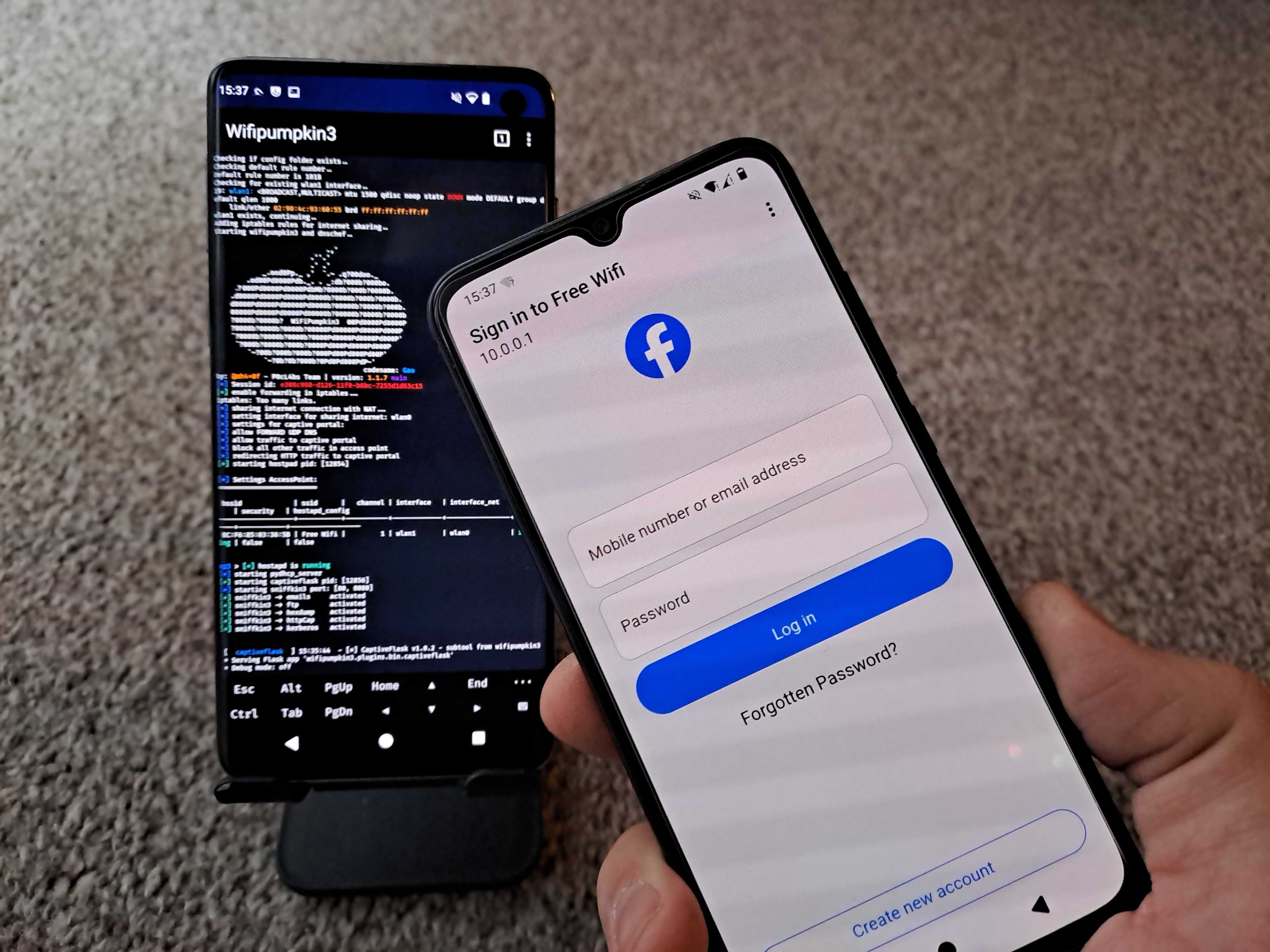
Wifipumpkin3 tab now has preview available in in NH app, updated by @yesimxev. He also added the latest templates of @IKTEACH and @dr.rootsu - Facebook, Instagram, iCloud, Snapchat. Credits for the great collaboration.
Miscellaneous
The kernel install tab is temporarily disabled as it needs some more maintenance. You will notice that @kimocoder started transforming some of the fragments to the new style. He also added a very early alpha version of the in-app terminal. You can enable in Kali NetHunter app settings if you’d like to check it out. Most commands will still go to the external Terminal app. Magisk installer now supports modules install, credits to @cyberknight777. Therefore, installed Kali NetHunter kernel modules will show up in Modules tab.
Kali NetHunter Live Podcast
@yesimxev hosted the first NetHunter Live Podcast featuring @Lukas Stefanko, also known as Mobile Hacker. Live wireless attacks from phone and smartwatch, kon-boot Windows password bypass using smartwatch, Q&A, and guest talk. Make sure you check out if you missed the live stream! Episode two coming in January. Feedbacks are very welcomed.
Kali NetHunter Blog Interview
A deep dive into our lead Kali NetHunter developer, @yesimxev’s mind. His story of how he’s got into cybersecurity and NetHunter, a brief overview of features, devices, future plans, and more!
Kali Documentation
We have refreshed ourKali documentation with updates to current pages and a handful of new ones:
- Graphics issues on bare-metal installation (new)
- Installing NetHunter on the Samsung Galaxy S10 (new)
- Setting up a system for packaging (updated)
Community Shout-Outs
These are community members who contributed to Kali during the latest release, and we want to recognize their efforts (we believe in giving credit where it’s due!).
Anyone is welcome to contribute, and anyone can get involved!
New Kali Mirrors
We have 3 new mirrors in Asia! Those are:
- India: mirrors.esto.network, sponsored by Esto Networks and thanks to Rahul Makhija.
- South Korea: mirror2.keiminem.com, sponsored by Keiverse.
- South Korea: mirror.eliv.digital, sponsored by PROJECT ELIV and thanks to Chobi.
And 1 new mirror in the North America:
- United States: mirror.us.cdn-perfprod.com, thanks to Marc Gómez.
If you have the disk space and bandwidth, we always welcome new mirrors.
Miscellaneous
Here are a few additional Kali updates we are calling out, though they do not warrant a deep dive:
- Our status page has been refreshed!
- Early this year, @arnaudr gave a talk at DebCon25 about mirrorbits (Slides, Video)
- Various CI fixes for Kali Cloud & Kali WSL App
Get Kali Linux 2025.4
Fresh Images: So what are you waiting for? Go get Kali already!
Seasoned Kali Linux users are already aware of this, but for those who are not, we also produce weekly builds that you can use. If you cannot wait for our next release and you want the latest packages (or bug fixes) when you download the image, you can just use the weekly image instead. This way you will have fewer updates to do. Just know that these are automated builds that we do, not QA like we do for our standard release images. But we gladly take bug reports about those images because we want any issues to be fixed before our next release!
Existing Installs: If you already have an existing Kali Linux installation, remember you can always do a quick update:
┌──(kali㉿kali)-[~]
└─$ echo "deb http://http.kali.org/kali kali-rolling main contrib non-free non-free-firmware" | sudo tee /etc/apt/sources.list
[...]

┌──(kali㉿kali)-[~]
└─$ sudo apt update && sudo apt -y full-upgrade
[...]

┌──(kali㉿kali)-[~]
└─$ cp -vrbi /etc/skel/. ~/
[...]

┌──(kali㉿kali)-[~]
└─$ [ -f /var/run/reboot-required ] && sudo reboot -f
You should now be on Kali Linux 2025.4. We can do a quick check by doing:
┌──(kali㉿kali)-[~]
└─$ grep VERSION /etc/os-release
VERSION="2025.4"
VERSION_ID="2025.4"
VERSION_CODENAME="kali-rolling"

┌──(kali㉿kali)-[~]
└─$ uname -v
#1 SMP PREEMPT_DYNAMIC Kali 6.16.8-1kali1 (2025-09-24)

┌──(kali㉿kali)-[~]
└─$ uname -r
6.16.8+kali-amd64
NOTE: The output of uname -r may be different depending on the system architecture.
As always, should you come across any bugs in Kali, please submit a report on our bug tracker. We will never be able to fix what we do not know is broken! And Social networks are not bug trackers!
Want to keep up-to-date easier? We’ve got you!