Wayland
Table of Contents
What is Wayland? Or X11?
On Linux systems, the display server is a central part of the graphics stack, it’s involved in displaying everything you see on the screen, and it also deals with user input (mouse, keyboard, touchscreen and so on).
X11, also called the X Window System, or X.Org, or simply X, was the traditional display server for Linux, first released in 1984, and still widely in use today. Wayland is a replacement for X11. Initially released in 2008, it has been actively developed since then, and it is indeed replacing X11.
At the time of this writing, some Linux desktop environments (or DE for short) use Wayland natively, others still use X11. Some DE will never be ported to Wayland, as it represents a lot of work.
To finish this brief presentation: XWayland is a compatibility layer, it allows X11 applications to run on Wayland desktop environments.
Wayland in Kali Linux
Am I using Wayland in Kali Linux?
Open a terminal and type:
kali@kali:~$ echo $XDG_SESSION_TYPE
If the output is wayland, then yes, your desktop is running under Wayland. If the output is x11, then your desktop is running under X11.
Xfce
The Xfce desktop uses X11, and this won’t change in the near future. One can check the Xfce Wayland Development Roadmap for more details.
GNOME
Since Kali Linux 2025.4, Wayland is the default and only display server for the GNOME desktop.
KDE
Since Kali Linux 2023.1, Wayland is the default display server for the KDE desktop.
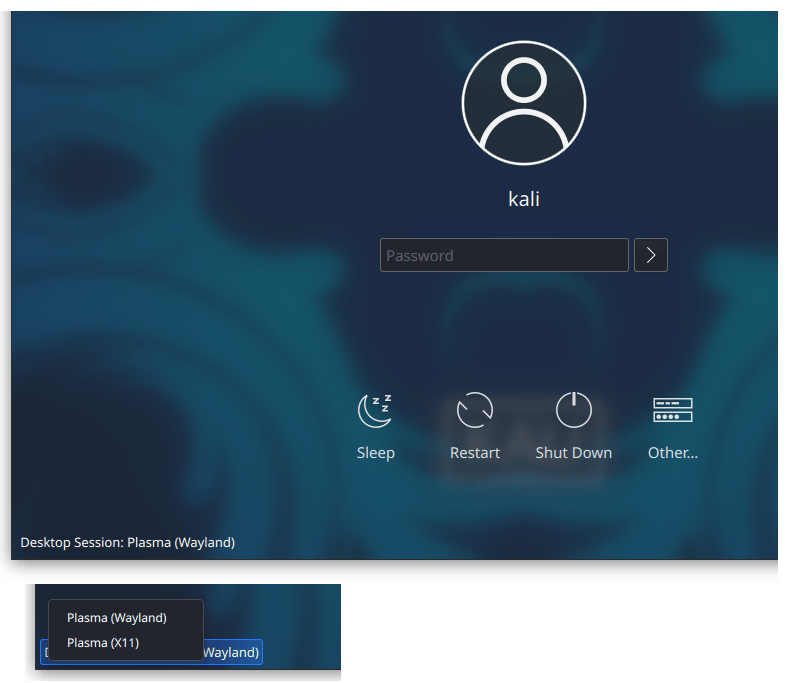
If this is causing issues for you (ie. if some applications are not displayed nicely, or if you notice any graphical issues that were not there before), you can try to use the legacy X11 server instead. This is something you can choose from the login screen: at the bottom-left corner of the screen, click on Desktop Session and choose Plasma (X11).
Updated on: 2026-Mar-11
Author:
arnaudr